

Cookie banner for WordPress. No cloud, no visitor limit, no loss of speed.
The banner asks, holds services back until someone agrees, and keeps the record in your own database. Everything runs on your server — no outside service that has to have a say.
- Everything stays on your server
- No surcharge for more visitors
- No data processing agreement with us
- Free version for good
No account needed. Afterwards, any paid plan can be tested free for three months — the test ends by itself.
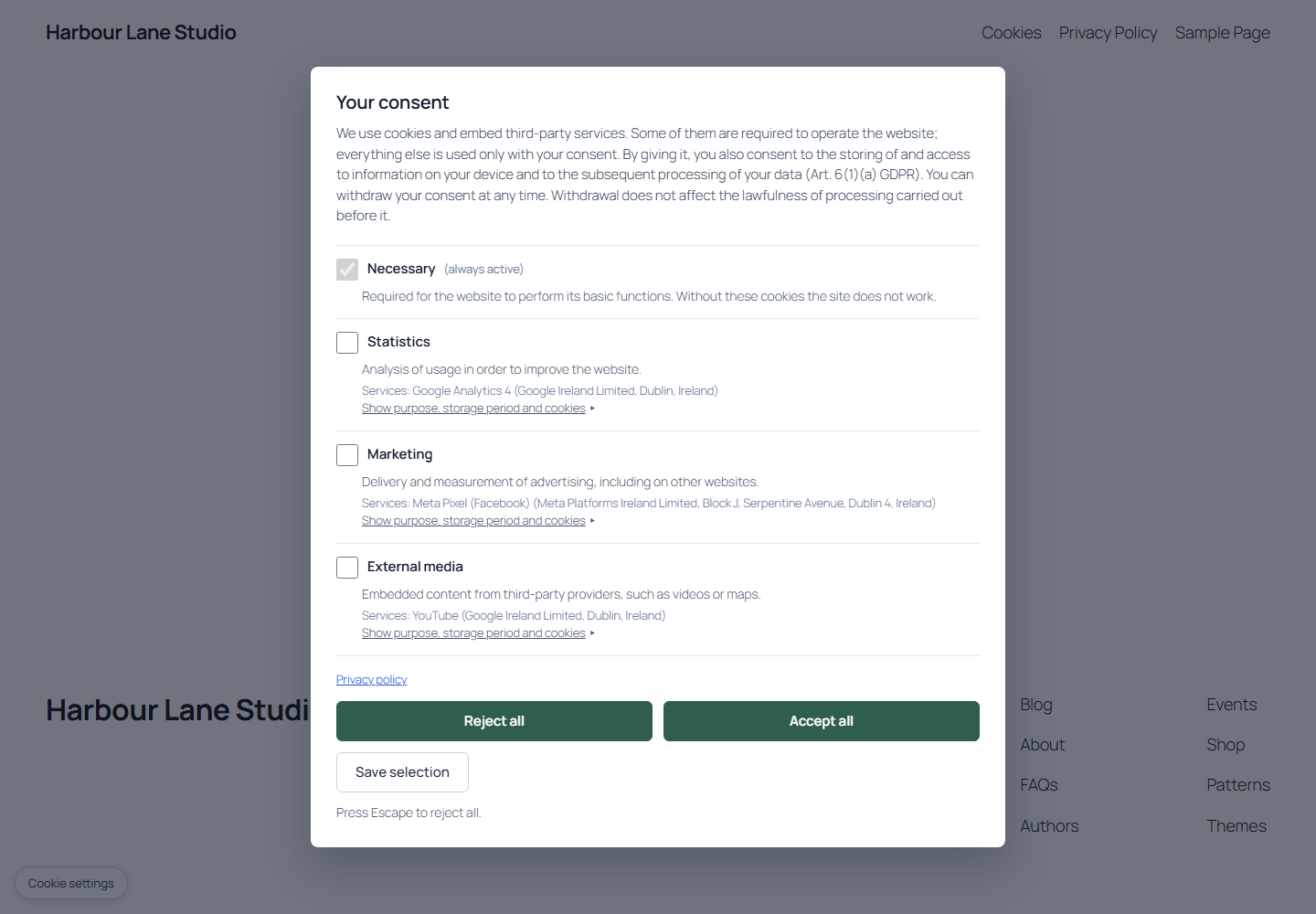
What this means for your site
Three things that would otherwise cost you speed, time or money.
01 · Nothing runs beforehand
Google Analytics, the Facebook pixel and the like do not start at all
The plugin holds them back on your server — not in the browser, when they have long been loaded.
The limit: What a theme writes directly into a template file is not covered. The scan finds it and shows it to you — removing it is then up to you.
02 · Your site stays fast
Your cache plugin keeps working
The page is cached once and fits every visitor. You do not have to exclude any page from the cache or wait for an outside server.
03 · Data stays with you
Consents and records sit in your WordPress database
We learn nothing about your visitors. You need no data processing agreement with us for this.
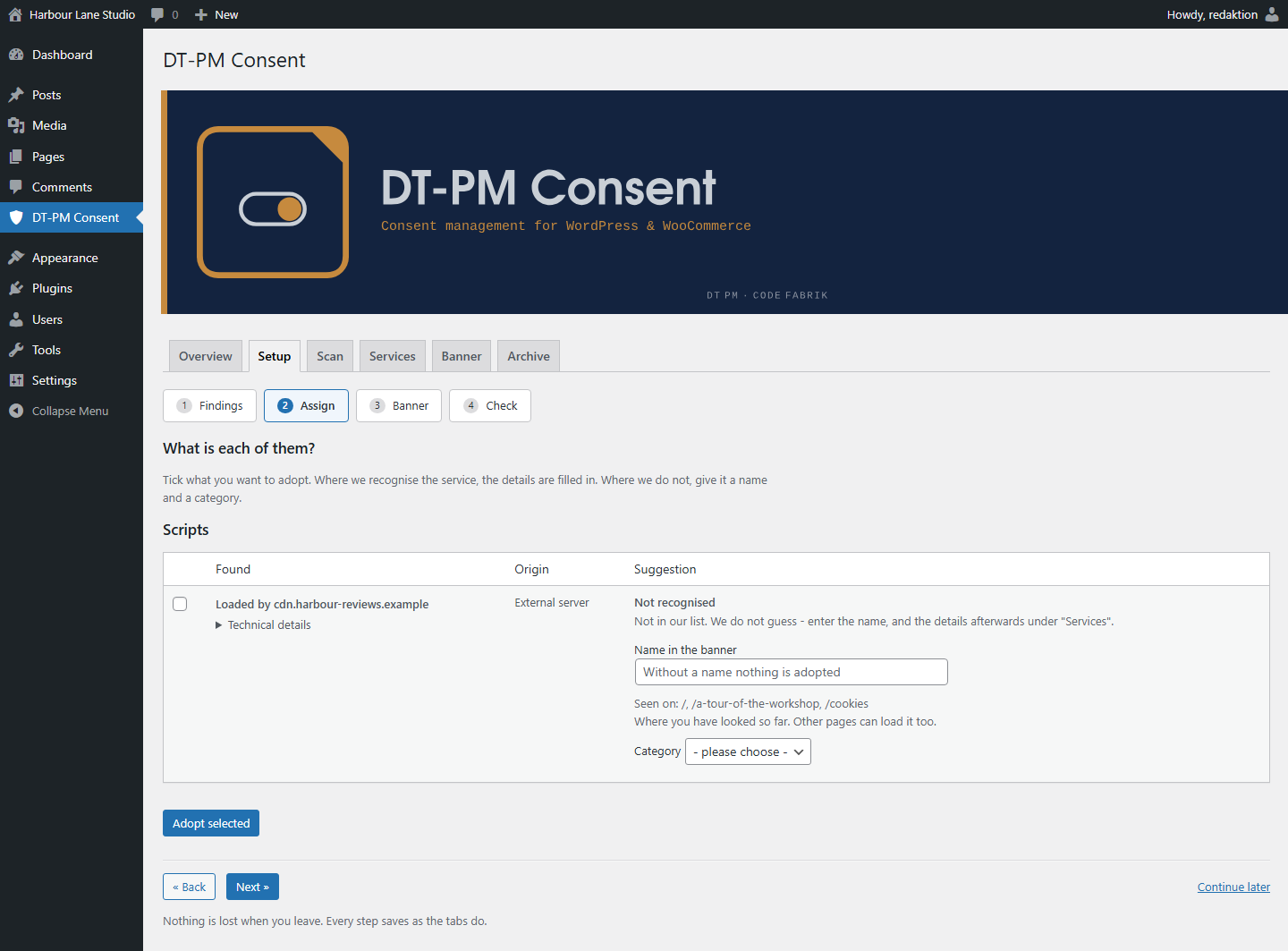
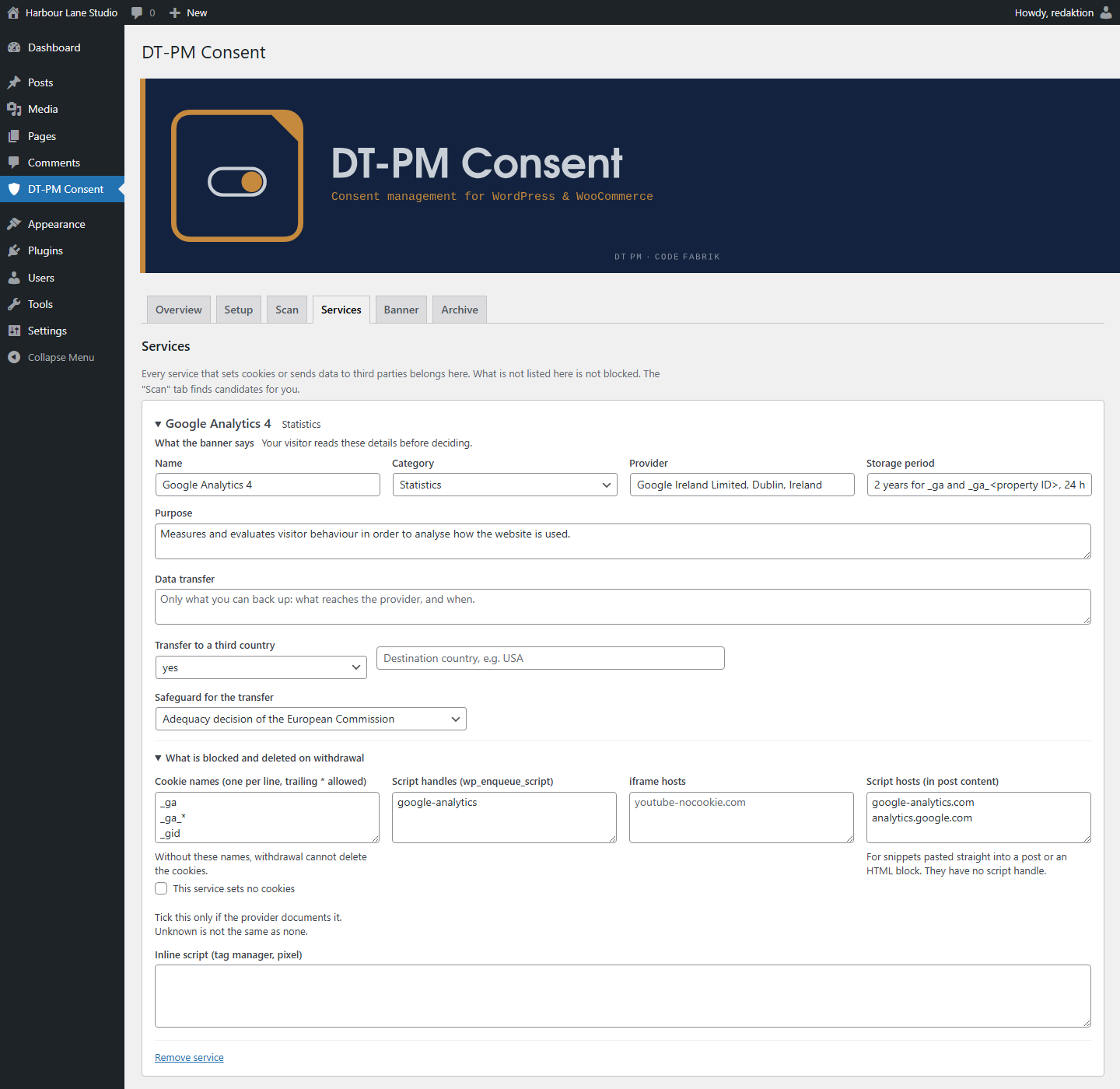
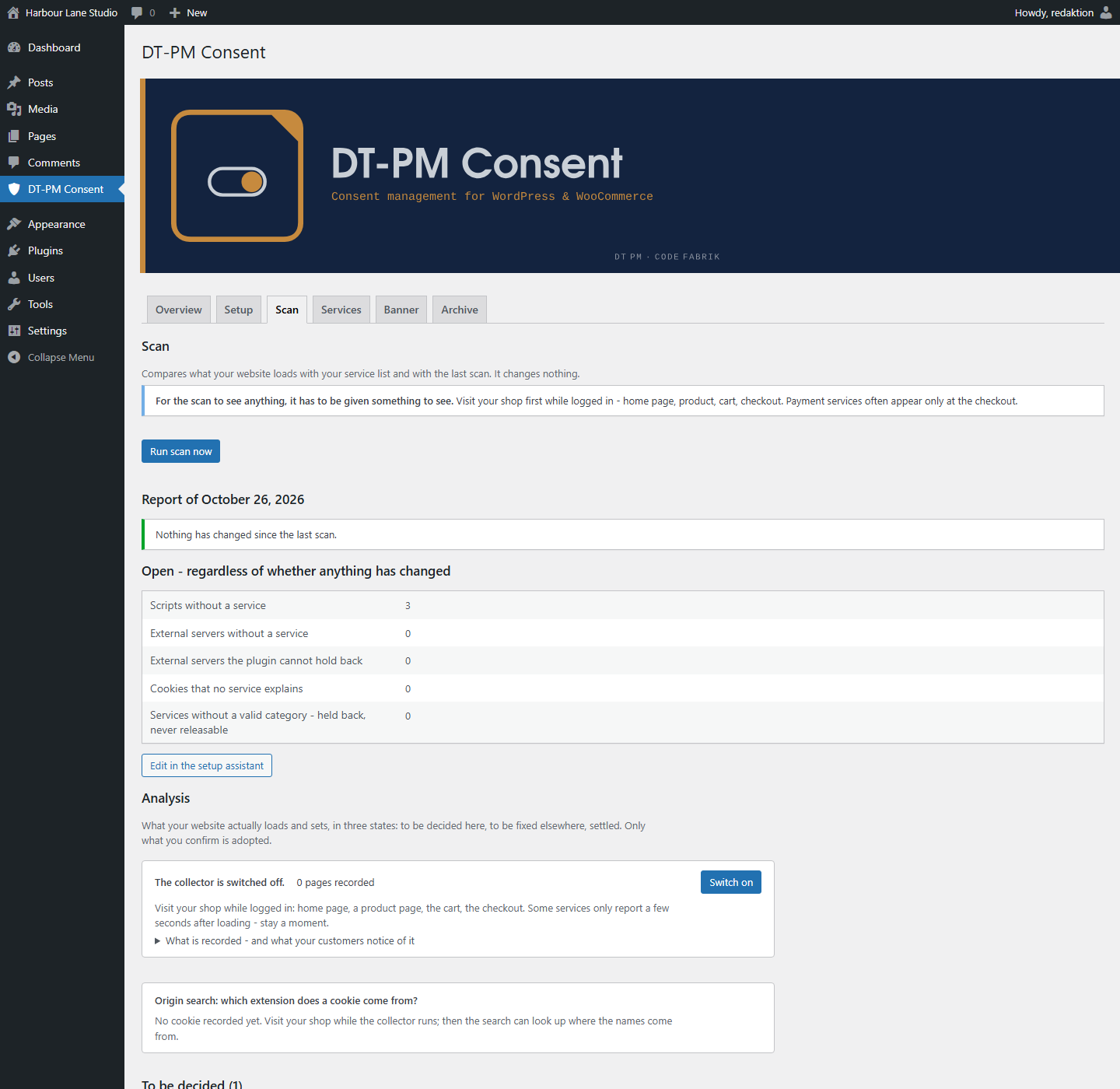
What it looks like in WordPress
Screenshots of a running installation, not a mock-up.
How a page is served, side by side
What happens when a visitor opens your site.
A cloud service
- The visitor opens your site.
- The page loads a script from the provider.
- The provider delivers the banner.
- Only now is it settled what is held back.
- If the provider is down, the banner is missing.
DT-PM Consent
- The visitor opens your site.
- The page comes ready from your cache.
- The banner is already in it.
- The services are already held back.
- No outside server is involved — none can go down.
Who it is built for
WooCommerce shops
Where speed is revenue and visitor numbers vary
- Checkout does not slow down, because nothing is loaded from outside
- No billing by page views — a good month costs no more
- Google Consent Mode v2 in Basic and Advanced mode
Agencies and freelancers
Where many client sites need the same setup
- One plan covers up to 25 websites, another unlimited
- Set up over the MCP bridge instead of by hand in every back end
- No data processing agreement to explain to your clients
What the plugin does
Everything in this list is already in the free version.
Consent and records
Versioned texts. If you change a banner text, the old version is kept. The record shows which version applied when someone agreed.
Records as a file. One button, one file to take away — for the folder where your documents live.
Setup and design
Installation without external accounts. No account to create, no key to fetch, nothing to confirm. Upload, activate, done.
Design from the theme. The banner takes colour and font from your website, without you writing CSS.
Use and operation
Keyboard operation. The banner and the settings can be operated entirely by keyboard, and the focus is visible.
Runs behind any firewall. Even on an intranet or a site that may not reach the internet: the banner needs no outside connection.
The banner speaks eight languages
English is built in. You download the other seven and upload them in the “Banner” tab — without another plugin.
German, French, Dutch, Italian, Spanish, Polish and Romanian.
Your AI assistant sets it up
If you work with an AI assistant, it can operate the plugin directly — over the MCP bridge, with 21 tools.
Example, not a transcript
You: Read the service catalogue of my site and tell me what is not yet assigned to a category.
Assistant: Four services without a category. Two are fonts, one is a map, one a payment provider.
You: Assign them and switch the banner texts to the informal form.
Assistant: Done. The change is recorded as a new version.
The key is yours
It can be revoked at any time. Every change made over the bridge is marked as such in the records.
We see none of it
The connection runs between your installation and your own assistant. Nothing of it reaches us.
Start for free. Pay when you want less manual work.
Two versions, one setup. The paid one requires the free one and adds to it.
Free version
€0 for good
- Everything from “What the plugin does”
- Scan once a month, started by hand
- Banner in eight languages
- On as many websites as you like — one installation per website
Paid version
from €59 / year net
- Monitoring at your pace: weekly or daily, with an email as soon as a new service appears
- Service list refreshed daily — analytics, fonts, payment providers, without waiting for the next plugin version
- Google Consent Mode v2: Basic is the default. Advanced only if you switch it on deliberately twice — there you are responsible for what is sent before consent
- Your own colour, font and logo in the banner
- Your own banner texts per language
- Several websites, depending on the plan
The difference is not a better legal basis through a higher plan, but less manual work and more control.
For agencies and developers
MCP bridge with 21 tools
The plugin can be operated from outside over MCP: add services, assign categories, maintain texts, start scans, fetch reports. With its own key per installation that you can revoke at any time. Included in every paid plan.
Local instead of cloud
| Characteristic | A cloud service | DT-PM Consent |
|---|---|---|
| Where the banner is made | at the provider | in your WordPress |
| Billing | often by page views | by websites |
| Page cache | exceptions needed | stays usable |
| Where consents are stored | at the provider | in your database |
| Data processing agreement | needed with the provider | not needed with us |
| If the provider goes down | the banner is missing | nothing goes down |
| Intranet, behind a firewall | not possible | possible |
After the three months
The point where plugins get unpleasant. Here it is stated on the page, not in the small print.
During the test
Three months with everything, free of charge. Once per website, not repeatable.
Afterwards, without buying
Nothing is switched off. The banner keeps asking, services stay held back, withdrawal works.
What stays
The records archive stays readable and keeps being written. Your settings stay as they are and can still be changed.
What goes: the automatic check, the ongoing update of the service list, and additional websites.
Your initial price stays — as long as the subscription runs without interruption. Price increases then apply to new customers, not to you.
Four questions that come before the download
Does this keep me on the safe side legally?
The plugin gives you the technical means: ask, hold back, withdraw, keep records. Whether your website as a whole is in order also depends on things outside the plugin — it does not replace that review, and it does not assess any individual case.
Does it work with my cache plugin?
The page is cached once and fits every visitor — there is no exception you would have to set up. With every build of the plugin we test this with Cache Enabler. We have not tested it with WP Rocket or LiteSpeed Cache.
What do you learn about my visitors?
Nothing. For the licence check, the paid version reports the licence key and the website address — nothing else: no visitor data, no usage statistics.
Can people with disabilities use the banner?
It can be operated entirely by keyboard, the focus is visible, and the banner is checked automatically against WCAG 2.2 AA with every build, contrasts included. Whether a screen reader reads out status messages, we have not yet listened to.
Install first, then decide
The free version stays free. Everything else you can try free for three months — no subscription, no cancellation needed.