
Purchase advice for WooCommerce that works from day one.
Customers describe what they need. The Sale Assistant matches the need to the products in your catalogue through a causal chain — without purchase history, with prices and stock live from WooCommerce.
- From day one
- No purchase history needed
- Live prices from WooCommerce
- Service questions too
Free start: 100 parent products · 50 conversations · trial month free, ends by itself
How a recommendation comes about
Three steps, each one traceable.
-
1 · Question
The customer describes what they need
In their own words — even without knowing the technical terms, styles or varieties.
-
2 · Causal chain
The need is matched through a decision model
The matching follows stored links between needs and product properties — not purchase history.
-
3 · Recommendation
Products with price and stock from WooCommerce
Prices and stock come live from your shop.
Features
A real decision model instead of mere keyword search.
Useful from day one
The recommendations rest on a model of your categories, not on collected behaviour of earlier visitors. There is therefore no run-up period with too little data for usable suggestions.
You review the model before it goes live
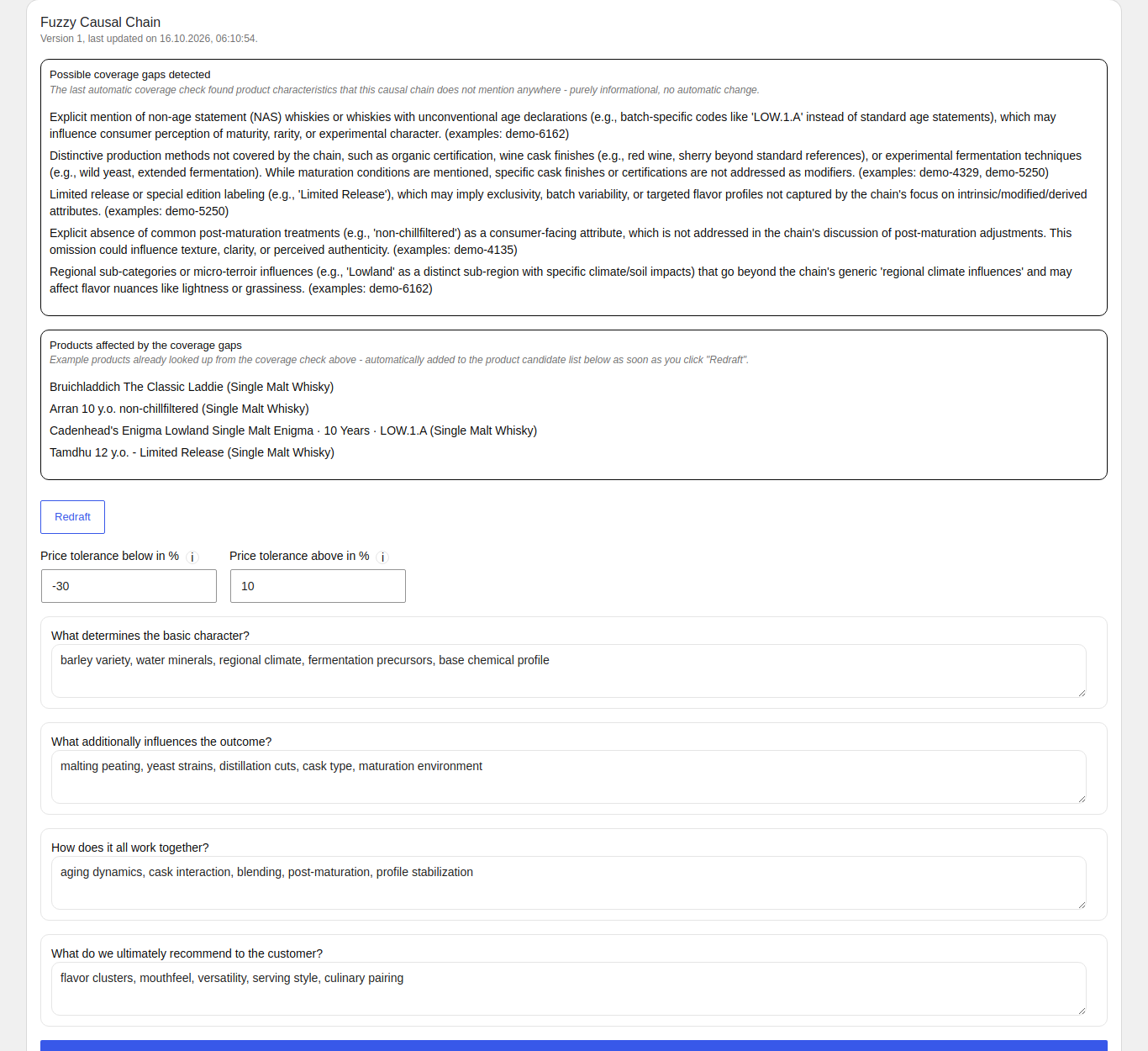
The causal chain of a subcategory — what actually decides the purchase — is proposed and approved by you. You see and change what the advice rests on. No guesswork, no black box.
Prices and availability come live from the shop
What the assistant says about price and stock is fetched from WooCommerce at the moment of the answer. There is no second price store that can go stale.
How setting it up works
Three steps until the assistant gives advice.
-
Step 1
Map categories
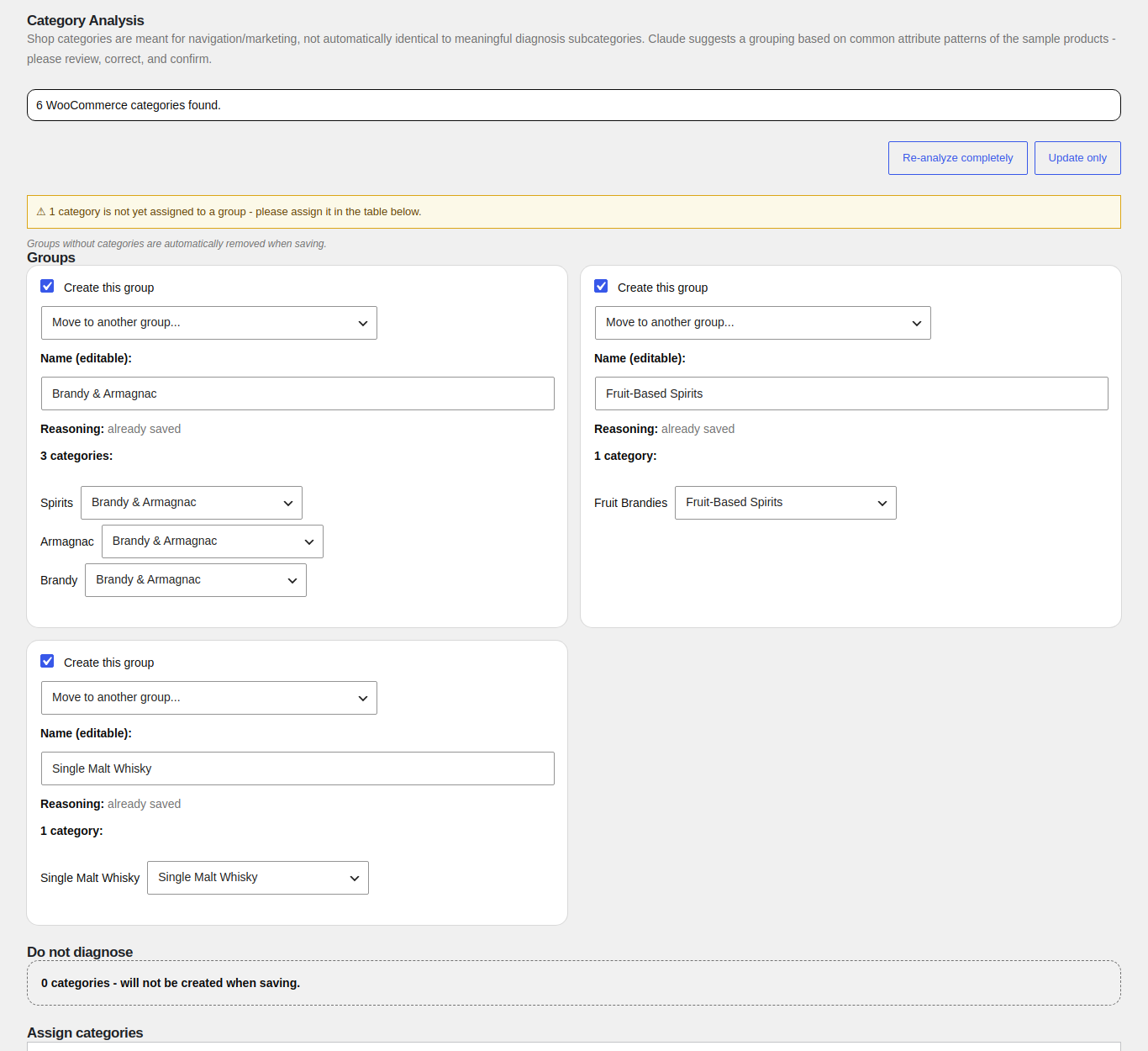
You map your existing shop categories to the topics that actually matter for advice.
-
Step 2
Review the decision model
A draft is created for each category, which you read, adjust and confirm before it is used.
-
Step 3
Have products processed
Your catalogue is prepared on that basis so the assistant can make suitable suggestions.
Everything keeps running in the background, even when you leave the page. Long waiting times do not hold you up.
What your customers see
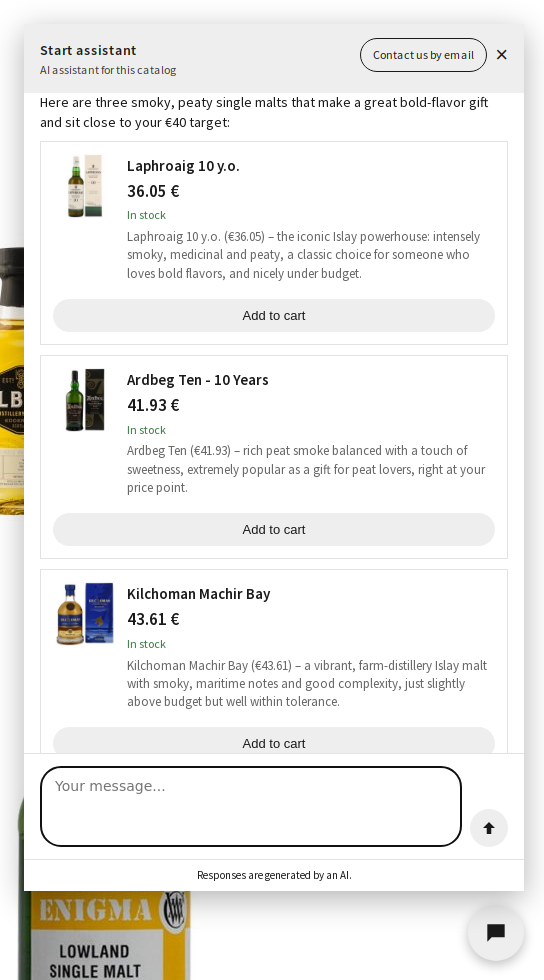
A chat window right in the shop. A question such as “I am looking for a robust gin to drink neat” leads to a specific, reasoned recommendation from your own range — with real, current prices and availability, not invented ones.
What the plugin does
Advise in the shop
- Chat window on product pages and the home page, with an add-to-cart button
- Wording in your own tone, written by hand or derived from your own pages
- Handover to your team: the model summarises the request, the customer confirms, then an email goes to you
Open up the range
- Analysis of your WooCommerce categories and a proposal of sensible subcategories
- Causal chains per subcategory, proposed and released by you
- An overview of which products are prepared for the advice and which are not
Get better
- Customer feedback on a recommendation, helpful or not
- A summary of the negative feedback for reworking the model
Requirements
- WooCommerce, active — without WooCommerce the plugin does nothing
- WordPress 7.0 or later and PHP 8.2 or later
- An outbound HTTPS connection from your server to our service
Start for free, then test everything for a month
Two separate offers — not to be confused.
Free
€0
- 100 parent products
- 50 conversations, once
- Credited with the first real catalogue upload
- Your own key from Anthropic, Mistral or OpenAI is possible — conversations still count against the 50
- Conversation credit can be bought, without a tier
Trial month
30 days, Medium tier
- Up to 500 products
- Free, ends by itself — no subscription
- No additional conversations
- Started in the plugin, “Status” tab
- Afterwards back to Free: products already processed stay, any excess is deferred
What leaves your shop
The path of the data, without glossing over it.
-
Your shop
WooCommerce with the plugin
-
DT-PM
api.dt-pm.eu
Order data goes to the core API
-
AI provider
Anthropic, Mistral or OpenAI
Order data also goes to the AI provider
Product search always runs on Mistral embeddings. Your own key changes which provider you use — it does not replace this data path.
Two things follow from this
Data processing agreement
First, for this product you need a data processing agreement with us. We provide it; without it you must not operate the chat window.
Consent management
Second, the chat window belongs in your consent management. With DT-PM Consent it can be listed as a service and held back until consent is given — the two together are the reason we offer both families.
All transfers in detail
| When | What is transferred |
|---|---|
| When the plugin is activated | Once, the address and name of your shop, in order to set up the account for your shop. |
| Daily and weekly, as long as the plugin is active | Only your account identifier. No product data. |
| Only after you have set up category analysis and causal chains yourself | The same check-ins additionally transfer product SKUs and category names from your range. Before this step no product data is transferred. |
| When a visitor uses the chat | The messages typed and, where relevant, the product page currently being viewed — from the visitor's browser to our service. |
| When a logged-in customer asks about one of their own orders in the chat | Status, order date, items, shipping method and tracking numbers of that order, to our service and on to the AI provider to write the reply. Only orders of the logged-in customer themselves, never a guest's or another customer's. |
| When you assign a page as a policy (shipping, returns, withdrawal, payment) | The text of that page, when you save and then once a day for as long as the assignment stays. If you remove the assignment, the text is deleted on our side. |
| On a handover to your team | The summary and the customer's contact details are not sent to us: your WordPress emails them directly to your support address. All we receive is the check that a handover was offered, with your account identifier and an internal conversation reference. |
In the free version, anonymised structural patterns help improve the service for everyone: only the category type and the decision factors used, no product names, no prices, no customer data, and nothing traceable to your shop. Paid plans let you switch this participation off.
On your own infrastructure, if you wish
- Anthropic
- Mistral AI
- OpenAI
If you wish, you add your own API key, on every tier, the free one included. Anthropic, Mistral AI and OpenAI are supported, each with a choice of model. The chat replies then run through your own account, and you pay for them directly with your provider.
On the free tier, conversations count against the starting credit of 50 conversations even with your own key. On paid tiers with your own key, we do not count.
Knowledge pool
What is shared is the anonymised structure of the causal chains — that is, which properties drive a purchase decision in a product group.
Shared
- Category type
- Decision factors used
Not shared
- Product data and product names
- Pricing
- Customer data and conversations
The data cannot be traced back to your shop. Participation is mandatory in the free version. From the paid tiers on, you can switch it off.
Service questions too
What advice answers, and when the service agent needs a key.
Included in advice
Advice also answers service questions on Free, without your own key and without a purchase. The conversation counts against the 50.
Dedicated service agent
Needs your own key or purchased credit.
Handover to people
The handover does not cost an extra conversation. A chat counts as one conversation when it starts; once the starting credit is used up, the assistant is locked.
Try it in your own shop
100 parent products and 50 conversations for free. The trial month is free and ends by itself.